

Plastisol screen printed transfers
Real screen print, ready for your heat press.
Real plastisol ink, screen-printed on carrier paper and ready for your heat press. Four formulas tuned to fabric, feel, and finish, from soft-hand cotton tees to glitter and metallic.
 Advanced GP
 Advanced HP
 Metallic
 Glitter
- Shipping on every order
- Free
- Per sheet, as low as
- $1.54
- Production after proof
- 1–4 days
- Sheets per design, minimum
- 6
Four formulas, each matched to a fabric.
Pick the formula, upload your art, and approve the proof. We do the rest. Six-sheet minimum across the entire lineup.
Best SellerAdvanced GP
Cotton, polyester & blends
Our workhorse. A hot-peel screen-printed transfer with the look and feel of direct screen print — built for cotton, polyester, blends, and most fabrics that can handle the press temperature.
- Hot Peel
- 320–350°F
- 12 sec
Advanced HP
100% cotton & cotton-rich blends
Soft retail-feel hot-peel transfer with good opacity. Best for 100% cotton and cotton-rich blends. Drapes like a tee, prints like a pro — the choice when hand-feel sells the shirt.
- Hot Peel
- 375–400°F
- 10–12 sec
Metallic
All fabrics
High-shine metallic plastisol with a screen-print feel and real reflective punch. Gold, silver, rose gold, champagne, and copper finishes.
- Hot Peel
- 300–330°F
- 12–15 sec
Glitter
All fabrics
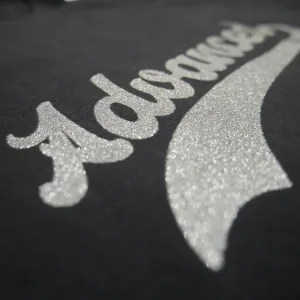
Real glitter suspended in plastisol. Hand-feels like screen print, sparkles like a stadium light. Perfect for spirit wear, cheer, and dance.
- Hot Peel
- 300–330°F
- 12–15 sec
Compare all four side by side.
Press temperature, time, peel, opacity, and fabric for every screen printed transfer. Every formula ships free with a six-sheet minimum.
Advanced GPShop → | Advanced HPShop → | MetallicShop → | GlitterShop → | |
|---|---|---|---|---|
| Best for | Cotton, blends, polyester (low temp test) | 100% cotton, cotton-rich blends | All fabrics (low-temp formula) | All fabrics |
| Press temperature | 320–350°F | 375–400°F | 300–330°F | 300–330°F |
| Press time | 12 sec | 10–12 sec | 12–15 sec | 12–15 sec |
| Peel | Hot Peel | Hot Peel | Hot Peel | Hot Peel |
| Opacity | High | Good | High | High |
| Feel | Standard plastisol, soft-medium hand | Soft, retail-quality, low build | Screen-print feel with metallic shine | Textured, soft-feel screen print |
| Turnaround | 1–3 business days | 1–3 business days | 2–4 business days | 2–4 business days |
| As low as | $1.54 / sheet | $1.54 / sheet | $1.69 / sheet | $1.69 / sheet |
| Scale | 250°350°450° | 250°350°450° | 250°350°450° | 250°350°450° |
- Best for
- Cotton, blends, polyester (low temp test)
- Press temperature
- 320–350°F
- Press time
- 12 sec
- Peel
- Hot Peel
- Opacity
- High
- Feel
- Standard plastisol, soft-medium hand
- Turnaround
- 1–3 business days
- As low as
- $1.54 / sheet
- Best for
- 100% cotton, cotton-rich blends
- Press temperature
- 375–400°F
- Press time
- 10–12 sec
- Peel
- Hot Peel
- Opacity
- Good
- Feel
- Soft, retail-quality, low build
- Turnaround
- 1–3 business days
- As low as
- $1.54 / sheet
- Best for
- All fabrics (low-temp formula)
- Press temperature
- 300–330°F
- Press time
- 12–15 sec
- Peel
- Hot Peel
- Opacity
- High
- Feel
- Screen-print feel with metallic shine
- Turnaround
- 2–4 business days
- As low as
- $1.69 / sheet
- Best for
- All fabrics
- Press temperature
- 300–330°F
- Press time
- 12–15 sec
- Peel
- Hot Peel
- Opacity
- High
- Feel
- Textured, soft-feel screen print
- Turnaround
- 2–4 business days
- As low as
- $1.69 / sheet
Not sure which fits your garment? Talk to a print pro
Screen print transfer questions.
What they are, how to order them, how to press them, and how to keep them on the garment.
General
What are screen printed heat transfers?
Screen printed heat transfers are custom plastisol ink prints applied to a carrier paper, ready to be heat-pressed onto garments in your own shop. They give you the same look, feel, and durability as direct screen printing — without the equipment, chemicals, screens, and setup labor.
You upload your artwork, we print it, you press it. Clean, consistent, and professional every time.
How are screen printed transfers different from DTF transfers?
Screen printed plastisol transfers and DTF (direct-to-film) transfers produce very different results on the garment:
| Feature | Screen Printed | DTF |
|---|---|---|
| Feel | Soft, matte — traditional screen print | Plastic, shiny — film/sticker feel |
| Durability | Plastisol bonds into fibers | Adhesive layer sits on top |
| Opacity | High — pops on dark garments | Variable — often needs white base |
| Stretch | Moves naturally with fabric | Can crack or separate |
| Best for | Retail, uniforms, brand lines | One-off samples, novelty |
Screen printed transfers are the professional choice for anyone who wants their garments to feel and wear like retail-quality screen printing.
What types of screen printed transfers do you offer?
| Type | Best for | Temp | Peel |
|---|---|---|---|
| Advanced GP | Everyday cotton/poly/blends, high opacity | 320–350°F | Hot |
| Advanced HP | Soft retail feel on cotton | 375–400°F | Hot |
| Metallic | Bold metallics, all fabric types | 300–330°F | Hot |
| Glitter | Sparkle, spirit wear, cheer / dance | 300–330°F | Hot |
Which transfer type should I choose for my design?
Use this quick guide:
- Solid logos, text, simple graphics on most garments → Advanced GP
- Soft, retail-quality feel on cotton tees → Advanced HP
- Metallic gold / silver / rose gold finishes → Metallic
- Glitter effects for spirit wear, cheer, dance → Glitter
Not sure? Contact us and we’ll help you choose.
What is the difference between GP and HP?
Both are screen-printed plastisol transfers, but they use different formulas for different results:
- GP (General Purpose): All-around workhorse. High opacity, works on cotton, polyester, and blends. Great for most jobs.
- HP (Hot Peel): Softer feel than GP with good opacity. Best for cotton and cotton blends. Hot peel right after pressing.
Ordering & pricing
What is the minimum order?
The minimum order is 6 transfers per design.
How is pricing structured?
Pricing is per-sheet and drops as quantity rises. Each sheet can hold one design or a gang sheet of multiple designs. Prices below are starting points for a 1-color design:
| Quantity | GP / HP | Metallic / Glitter |
|---|---|---|
| 6–11 | $9.06 | $9.96 |
| 12–17 | $6.23 | $6.85 |
| 24–35 | $3.99 | $4.38 |
| 48–59 | $2.78 | $3.06 |
| 108–143 | $2.04 | $2.24 |
| 216–251 | $1.54 | $1.69 |
For quantities above 251, request a quote →
Can I do gang sheets?
Yes. Our pricing is per sheet regardless of whether it contains a single design or multiple designs arranged as a gang sheet. The maximum print area per sheet is 12″ × 17.5″. Arrange multiple logos, sizes, or designs on one sheet to maximize value.
Artwork & design
What are the artwork requirements?
Your artwork prints as submitted — including size, spelling, and layout. Please ensure:
- Artwork is uploaded at the exact size you want it printed
- Backgrounds are transparent unless a background is intended to print
- Artwork is in the correct orientation and not mirrored
- If resizing is needed, include exact width and height in order notes
What file formats do you accept?
- Preferred (Vector): AI, PDF, SVG, EPS — cleanest edges, most consistent results.
- Also Accepted: PSD, PNG, TIFF, JPG — provide at 300 dpi at final print size.
I design in Canva. What file should I upload?
Export from Canva as PDF Print for the best quality. Do not export as PNG or JPG — those produce lower-quality prints.
What files are not accepted?
We cannot use files from Cricut Design Space, Windows Paint, Apple Paintbrush, or similar basic design programs. These files typically do not separate cleanly for screen printing.
What about text in my design?
All text must be converted to outlines (Illustrator) or shapes (Photoshop) before submission. This prevents font substitution issues. Save a copy of your editable file before converting — outlined text cannot be edited as live text.
Can I print gradients and photos?
All four transfer types — GP, HP, Metallic, and Glitter — are best for solid, spot-color artwork. Gradients, fades, shadows, and transparency effects may not reproduce as intended.
What are the minimum detail requirements?
- Minimum printed line thickness: 1 pt (0.014 in)
- Minimum negative space: 2 pt (0.028 in)
- Artwork below these tolerances may print heavier, fill in, or lose detail.
Do you provide proofs before printing?
For custom orders with new artwork, we email a proof for approval before production — typically within a few hours to 1 business day.
Can you create or fix artwork for me?
Yes. Artwork services start at $25 for vectorizing, recreating, or creating new designs. Request a quote with your artwork and needs.
Application & pressing
What equipment do I need?
A heat press is required for all transfer types. A quality heat press provides the even pressure and consistent temperature needed for proper adhesion. Craft presses like the Cricut EasyPress or a home iron are not recommended for GP, HP, Metallic, or Glitter.
What temperature and time do I use?
| Type | Temp | Time | Pressure | Peel |
|---|---|---|---|---|
| Advanced GP | 320–350°F | 12 sec | Medium-firm | Hot |
| Advanced HP | 375–400°F | 10–12 sec | Medium-firm | Hot |
| Metallic | 300–330°F | 12–15 sec | Medium-firm | Hot |
| Glitter | 300–330°F | 12–15 sec | Medium-firm | Hot |
Always verify your heat press temperature with a heat gun — built-in thermostats can drift over time.
Step-by-step: how do I press screen printed transfers?
- Set your heat press to the required temperature for your transfer type.
- Once at temperature, press the bottom platen for 5–10 seconds (first press only).
- Place the garment on the press; press for 5 seconds to remove moisture and wrinkles.
- Position the transfer on the garment, image side down.
- Press for the required time at medium-firm pressure.
- Hot peel: peel immediately after opening the press. All four formulas are hot peel.
Always test-press on a scrap garment first.
Do I need to use a Teflon sheet or cover?
No. Do not use a Teflon sheet, parchment paper, or any cover sheet between the heat press platen and the transfer. Our transfers are designed for direct platen contact. A cover sheet can interfere with proper heat transfer and adhesion.
My transfers are not applying properly. What should I check?
- Temperature: Verify with a heat gun — don’t trust the built-in display alone.
- Pressure: Increase pressure slightly — insufficient pressure is the most common cause of poor adhesion.
- Garment compatibility: Make sure the fabric can handle the required temperature (some polyesters can’t handle 350°F+).
- Moisture: Pre-press the garment for 5 seconds to remove any moisture.
- Peel timing: Peel hot, right after the press opens.
- No Teflon sheet: Using a cover sheet is a common cause of application failure.
If none of these solve the issue, contact us — it may be a manufacturing error and we’ll make it right.
Can I use a home iron?
Screen printed transfers require even temperature and pressure, which is nearly impossible to achieve with a household iron. We strongly recommend a heat press for all transfer types.
What fabrics do your transfers work on?
| Type | Fabrics |
|---|---|
| Advanced GP | Cotton, polyester, blends, canvas — anything that handles 320°F+ |
| Advanced HP | Cotton and cotton blends only |
| Metallic | Most fabrics that handle 300°F+ |
| Glitter | Most fabrics that handle 300°F+ |
When in doubt about a specific fabric, test-press on a scrap garment first.
Durability & care
How long do screen printed transfers last on garments?
When properly applied, our plastisol screen printed transfers are designed to last the life of the garment — 50+ washes without significant fading, cracking, or peeling. Proper care is essential for maximum longevity.
How do I care for garments with screen printed transfers?
- Wash cold, inside out to reduce abrasion
- Hang dry is best; if machine drying, use tumble dry low or no heat
- Do not bleach
- Do not iron directly on the transfer
- Do not dry clean
- Avoid fabric softener
How long do unused transfers last in storage?
Unused transfers have a shelf life of approximately 6–12 months when stored properly. Keep them at room temperature, away from heat and direct light, in an airtight container. We recommend using transfers within 6 months for best results.
Turnaround & shipping
What is your turnaround time?
| Type | Turnaround after artwork approval |
|---|---|
| GP, HP | 1–3 business days |
| Metallic, Glitter | 2–4 business days |
| Stock transfers | 1–2 business days |
Turnaround times assume print-ready artwork. Orders requiring vectorizing, new design work, color changes, or artwork adjustments may need additional production time.
How long does shipping take?
- Free Standard Shipping (orders $35+): 3–5 business days after shipment
- Standard Shipping (orders under $35): $6.99 flat rate, 3–5 business days
- Priority Shipping: $10, 2–3 business days after shipment
What is the order cutoff time?
Monday–Friday at 1:00 PM ET. Orders placed after 1:00 PM or on weekends begin processing the next business day.
Do you offer rush orders?
Yes. Rush production is available upon request. Contact us with your deadline, and we’ll confirm availability and any rush fees.
Do you ship internationally?
Currently, we ship within the United States. For international orders, please contact us to discuss options.
Returns & guarantee
What is your return policy?
Because our transfers are custom-made to order, all sales are final and non-refundable. However, we stand behind our work. If you experience a quality issue, contact us within 14 days of delivery with your order number, photos, and a description of the issue. If we confirm a manufacturing defect, we’ll reprint your transfers promptly at no cost.
If the transfers are usable but produced differently than intended (such as a color mismatch), you may return them for review. If you keep them and still need a corrected reprint, the replacement is offered at 50% off.
Do you include extra transfers?
Yes. We typically include at least one extra transfer per design so you can test-press on a scrap garment before running your full production. Always test first — we are not responsible for garments damaged by incorrect application settings.
What if the color doesn't match what I expected?
Colors on screen (RGB) can look different than printed ink colors (CMYK). We recommend referencing Pantone colors in your order notes for the closest match. If your file includes colors that do not match what you want, list the intended colors in your order notes.
Do you keep records of my designs for reorders?
Yes. We retain your artwork and order history so reorders are fast and consistent. When placing a reorder, reference your previous order number for the smoothest experience.